Create your own web site information, web programing, Professional ERP, Open ERP, Odoo, AI photo Prompt Generator instance ComfyUI
Sunday, January 21, 2024
Multiple ControlNets and T2I-Adapters ComfyUI
Saturday, January 13, 2024
Ancient thai army by Bing Creators
Visualizing History: Crafting the "Ancient Thai Army" Scene with AI Image Creators
Welcome to a special post where we explore the power of readily available AI tools, specifically Bing Image Creator, to bring historical concepts to life. Today's focus is on the striking image, "Ancient Thai Army," which dramatically visualizes a traditional military scene.
While tools like ComfyUI offer deep customization, simpler platforms like Bing Creator excel at rapid prototyping and powerful conceptualization, making historical scenes accessible to all creators. The quality of this image demonstrates the advanced capabilities now common in standard text-to-image models.
📝 Prompt Reconstruction & Style Analysis
The core of this image lies in the precise blend of historical subject matter and dramatic cinematic style. Since Bing Creators uses a text prompt, we need to reconstruct the likely command used to achieve this result.
Recommended Prompt Structure (The Positive Prompt)
The prompt must define the army, the key subject (the elephant), the historical setting, and the dramatic atmosphere.
**SUBJECT:** A massive ancient Thai army marching forward. The main focus is a warrior chieftain riding a powerful war elephant (Chang Suek). The warrior is wearing detailed traditional Thai armor. **SETTING/ATMOSPHERE:** The scene takes place during sunset or sunrise, with dramatic golden light (god rays) streaming through. The background features a large, ancient fort or city wall (like Ayutthaya or Sukhothai era architecture). Dust and smoke fill the air. **STYLE/QUALITY:** Cinematic photo, highly detailed, historical accuracy, epic scale, volumetric lighting, hyper-realistic, 8k, digital painting.
Negative Prompt (Not explicit in Bing, but implied quality goals)
While Bing Creator might handle negative inputs differently, the goal is always to avoid common errors:
(Implicit goal is to avoid: Blur, modern elements, poor anatomy, cartoonish style, lack of detail.)
🎨 Key Elements of Visual Success
The success of the "Ancient Thai Army" image hinges on three critical elements, which you should explain in your blog post to add educational value:
Cinematic Lighting: The dramatic, golden light bursting through the background wall adds an epic, emotional dimension to the scene. This effect is achieved by including keywords like "golden hour," "sunset," and "volumetric lighting" in the prompt.
Historical and Cultural Detail: The model successfully renders Thai historical armor and the iconic war elephant, a tribute to the accuracy and vast training data of modern AI.
Composition and Scale: The low-angle shot and the sheer number of soldiers emphasize the monumental scale of the army, making the image highly impactful.
🚀 Conclusion: Bridging History and AI
The "Ancient Thai Army" image shows that even powerful conceptual images can be generated quickly using tools like Bing Creators. The key is in mastering the language of the prompt to communicate your historical vision effectively. This piece serves as a powerful demonstration of AI's capability to breathe new life into history.
What other historical scenes would you like to see visualized? Let us know in the comments below!
Monday, December 25, 2023
ComfyUI T2I-Adapter vs ControlNets
Thursday, December 21, 2023
Comfy UI Example for Scribble ControlNet
Comfy UI Scribble ControlNet
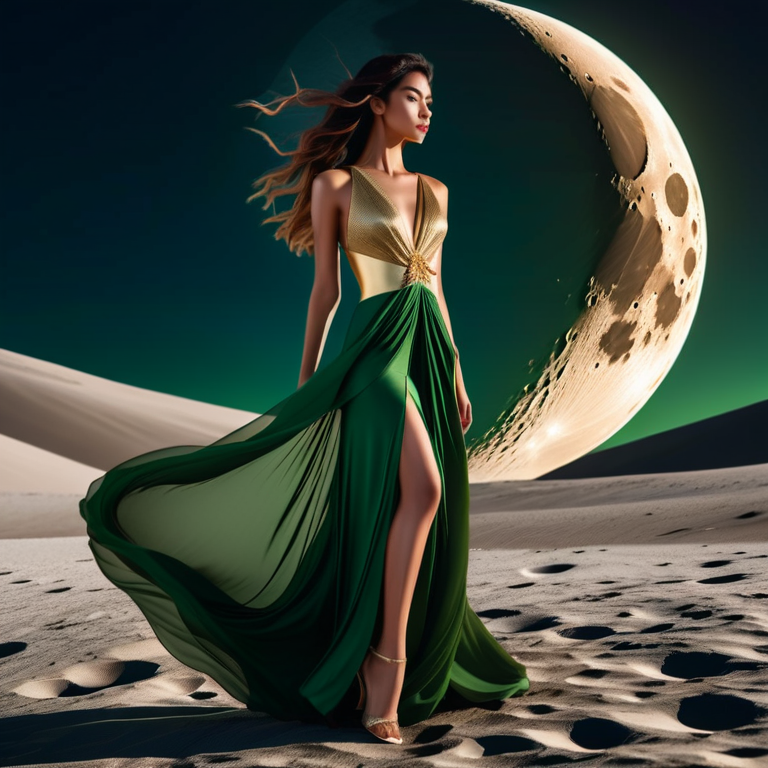
ComfyUI to create Lady in moon night
Lady in moon night
Unveiling the "Lady in Moon Night" 🌙: A Deep Dive into ComfyUI Workflow
Key Technical Specifications
| Parameter | Recommended Value (English) | Notes / Value Proposition |
| Model Used | Stable Diffusion XL (SDXL) 1.0 or a Custom Fine-Tuned Model (e.g., Juggernaut XL, SDXL Refiner) | State the specific model name. This helps users replicate your style. |
| Sampler/Scheduler | DPM++ 2M Karras or Euler A | The Sampler defines the noise reduction process. Mentioning this is highly technical and demonstrates expertise. |
| Steps | 25 to 35 | Number of steps the model took to process the image. |
| CFG Scale | 6.0 to 8.0 | Classifier Free Guidance. Higher values make the image follow the prompt more strictly. |
| Resolution | 1024x1024 or 1152x896 (Standard SDXL resolutions) | Always specify the exact output size. |
| V-A/E (VAE) | Required for SDXL (e.g., vae.safetensors) | Value Autoencoder. Essential for color quality in SDXL. |
Prompt & Negative Prompt Breakdown
Recommended Prompt Structure (The Positive Prompt)
Recommended Negative Prompt (The Negative Prompt)
Conclusion and Call to Action
The "Lady in Moon Night" is a perfect example of what can be achieved when leveraging ComfyUI's deep control over the generation process. The ability to fine-tune every node, from the initial latent sampling to the final VAE application, is what gives this image its unique, refined quality.
What are your favorite ComfyUI workflows? Let us know in the comments below!